
Let’s get your Melt coming again.
Had a subscription before? It's still here. Follow these six steps to update your card and restart.
Log in to your accountLog in to your Melt account
Use the email address you used for your subscription. Enter the sign-in code sent to that email address.
Choose Subscriptions
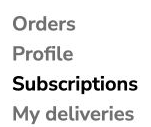
Once you are in your account, choose Subscriptions from the menu.
Find your past subscription
Choose View inactive subscriptions. If the page says “You don’t have any subscriptions yet”, your past subscriptions may still be behind this button.

Update your card
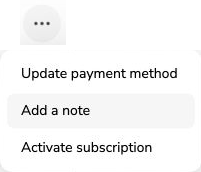
On the subscription you want to restart, tap the three dots (…). Choose Update payment method and follow the instructions to update your card. Return to your subscription when you have finished.
Check your delivery address
Please check your delivery address before restarting. Look for Shipping Address on that subscription. If it is wrong and you cannot change it, email us before restarting.
Restart your subscription
Open the three-dot menu on the same subscription and choose Activate subscription. Read the details shown, including any next payment or delivery date, before confirming.

Screenshots show the current account controls.